
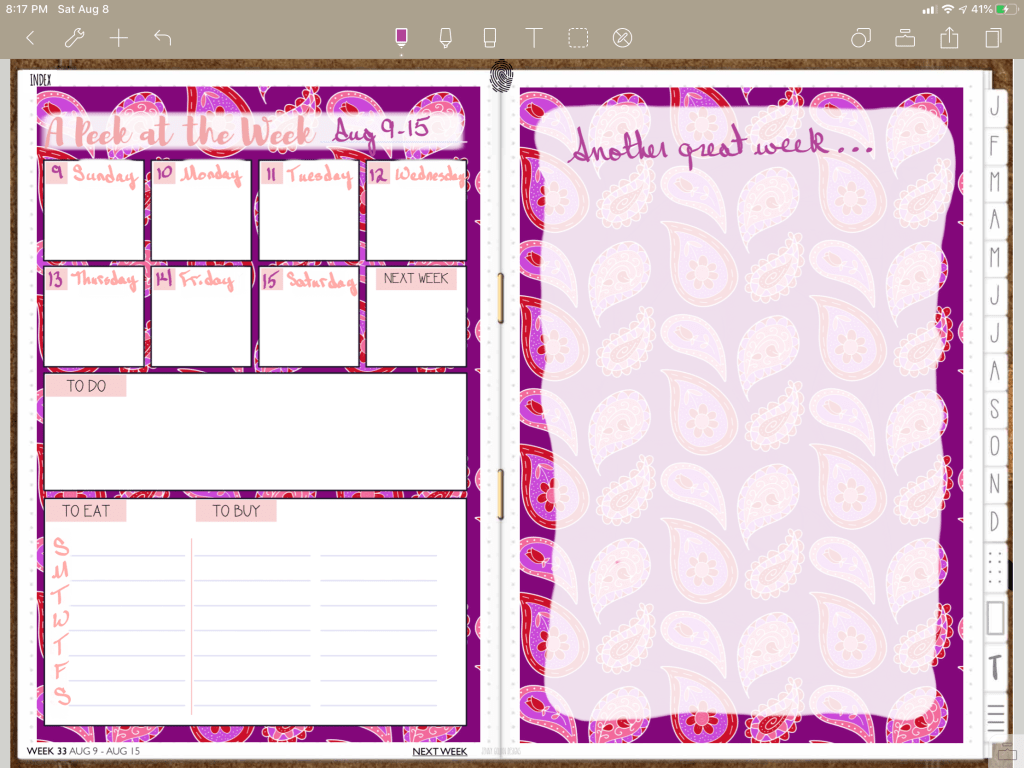
Welcome to Maria’s Craftroom! Today we’re making an easy weekly layout Weekly in Noteshelf using stickers and a highlighter to make an overlay.
Instructions:
Open your favorite planner in a writing app. I prefer to use the Noteshelf app for planning. Add in some colorful PNG stickers to use as a background. Lock the images in place so the new images over top don’t interfere with the ones below. Use a white highlighter to add a “shadow” so that the words on the left side of the image stand out. The weekly image on top was cut, then pasted over the highlighter. Use the highlighter in layers to form the overlay on the right side of the image. Then, simply write in your week! Super easy!
Video Instructions:
Products Used in this video:
Links Disclosure: The links below will take you to Jenny Gollan Designs. At the time of posting, I do not receive a commission from these sales. I simply love the products.
- 2020 DigiBujo: https://etsy.me/2T08xny
- Heat Wave papers: https://etsy.me/2Wn74Ld
- Salmon Pink Stickers: https://etsy.me/2KXbKnf
✂️Use code MARIACOUPON to save 20% @JennyGollanDesigns.
🌺Jenny Gollan Designs Facebook group: https://www.facebook.com/groups/DigitalPlannersWorldwide/
✍🏼Sign up for the Jenny Gollan Designs Newsletter for great info and freebies! It comes to you once a month. Sign up here: http://eepurl.com/0QFc9
Disclosure:
Crafting: All products were personally purchased. My videos express my experience and my personal opinion of the products I use. I do not work for nor represent any of these companies. I do not do sponsored videos.
Digital: I am a brand ambassador for Jenny Gollan Designs. However, I only show products I like and use myself. I either buy them, or get them at a discount unless otherwise identified as freebies.

 Maria’s Craftroom