
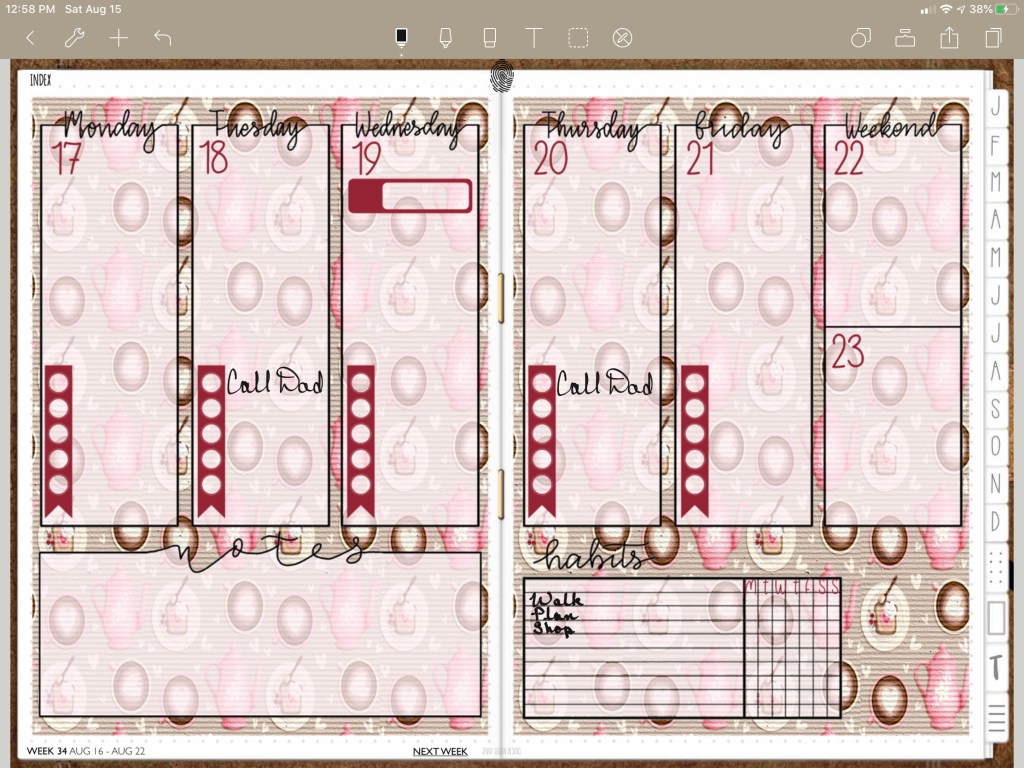
Hi this is Maria… Welcome to Maria’s Craftroom! Previously known as Maria’s Digital Planning, this will be my new home for all my ideas! Today we’re making an easy weekly layout in Procreate using Digital Papers and Procreate brushes, using a reference layer, and opacity in layers. Also, I show a bit about Noteshelf’s zoom tool settings.
The planner I use is fully linked, but customizable. This lets me be creative in so many different ways. Every week can be different, or the same. Also the days of the week. This easy layout was made in Procreate, saved as a PNG and is ready to use in any note taking app.
Instructions:
Open your planner in your writing app. I’m showing Noteshelf in the video below. Share or export the page you want to work on. You could also take a screen shot instead. Open that image in Procreate so that you can work within it’s parameters. The new image will be made to custom fit your planner. Once in Procreate, add in digital papers and/or stickers. I added a weekly transparent PNG sticker. Within Procreate, use a reference layer to fill in the boxes of the layout. Then lower the opacity on the boxes. Use Procreate brushes to add in digital stamps and text. Once you’re happy with the design, hide the background layer and the planner layer, export the image to photo roll, and add that new image into your writing app. Noteshelf allows you to lock the image, so that you can write over it without moving the background image. This is SO helpful! The Noteshelf zoom feature lets you write in very small spaces and has settings such as margins and line spacing you can customize. That’s it! Sounds complicated, but it’s really very simple.
Video Instructions:
Products Used in this Video:
Links Disclosure: The links below will take you to Jenny Gollan Designs. At the time of posting, I do not receive a commission from these sales. I simply love the products.
- 2020 DigiBujo: https://etsy.me/2T08xny
- Coffee Lovers Paper: https://etsy.me/2srYvTu
- Weekly: http://etsy.me/2CTMDd9
- Planner Sticker Stamps: https://etsy.me/30hMprc
- Font Sunday Breakfast: https://etsy.me/2FLejEM
✂️Use code MARIACOUPON to save 20% @JennyGollanDesigns
Shop here: https://etsy.me/1QJQ5GD
🌺Jenny Gollan Designs Facebook group: https://www.facebook.com/groups/DigitalPlannersWorldwide/
✍🏼Sign up for the Jenny Gollan Designs Newsletter for great info and freebies! It comes to you once a month. Sign up here: http://eepurl.com/0QFc9
Disclosure:
Crafting: All products were personally purchased. My videos express my experience and my personal opinion of the products I use. I do not work for nor represent any of these companies. I do not do sponsored videos.
Digital: I am a brand ambassador for Jenny Gollan Designs. However, I only show products I like and use myself. I either buy them, or get them at a discount unless otherwise identified as freebies.

 Maria’s Craftroom