
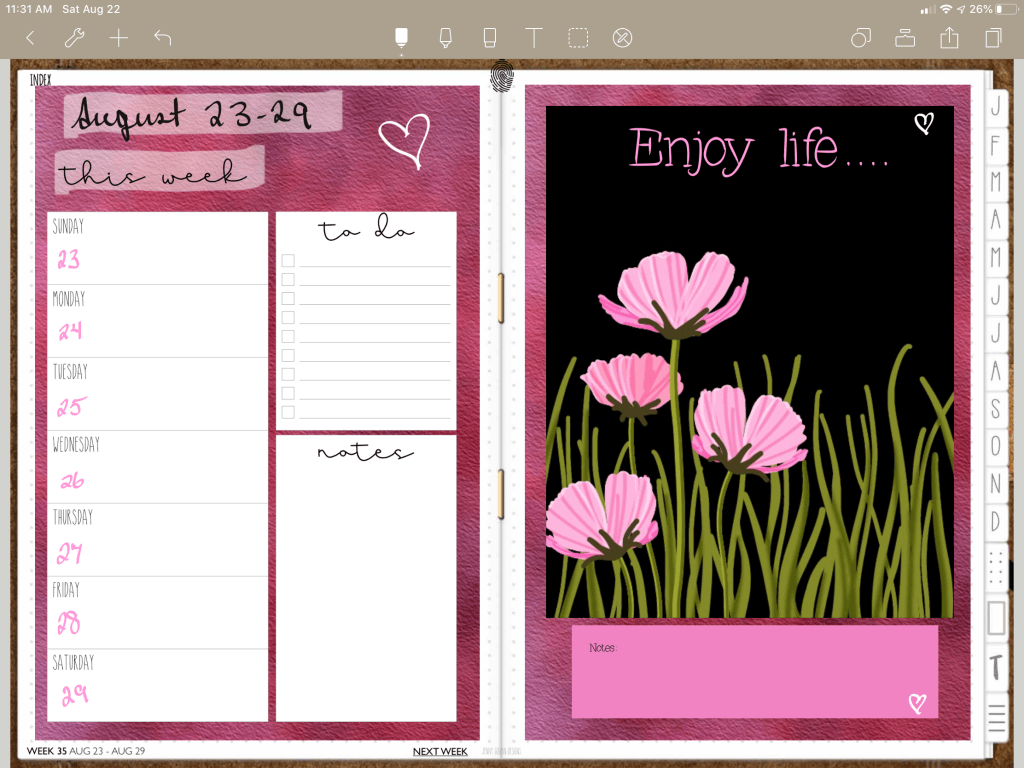
Hi this is Maria… Today, I’m showing an Easy layout in Noteshelf using Bring to the Front / Send to the Back lasso functions. So you not only have the option to lock images, you can also send one to the back or front as needed. We will also be using a colorful Sticky Note from the text function. Every time I use Noteshelf, I seem to find new features.
Instructions:
Working in Noteshelf, I brought in one of my favorite iwatch images. These are simply PNG files, so I use them everywhere. Then I added some colorful text over that. Next, bring in a colorful background paper and use the lasso to Move to the Back of the current work. This is a FANTASTIC feature. Duplicate the background to use on the other side of the planner and continue by adding a weekly PNG file. I like to use highlighter to make the wording on layout stand out. The highlighter can also use the Move to the Back functions of the lasso! Just make sure to NOT LOCK the background image. Lasso has it’s own rules, so play with it a while to get the hang of it. Once your item is in the back or front as you like, then you can lock the background so that the lasso is free to move the upper layers. Next use the text function to add a Sticky Note. You can change the color of your note or leave it transparent, size it to fit your space and add text. Super Easy!
Video Instructions:
🛍 Products Used in this video:
Links Disclosure: The links below will take you to Jenny Gollan Designs. At the time of posting, I do not receive a commission from these sales. I simply love the products.
- iwatch Simple Flowers: https://etsy.me/2HRLWo6
- Font Secretary: https://etsy.me/3hmCVnN
- Paper: https://etsy.me/31mCbH5
- Weekly: https://etsy.me/3cg1DCQ
✂️Use code MARIACOUPON to save 20% @JennyGollanDesigns
Shop here: https://etsy.me/1QJQ5GD
🌺Jenny Gollan Designs Facebook group: https://www.facebook.com/groups/DigitalPlannersWorldwide/
✍🏼Sign up for the Jenny Gollan Designs Newsletter for great info and freebies! It comes to you once a month. Sign up here: http://eepurl.com/0QFc9
Disclosure:
Crafting: All products were personally purchased. My videos express my experience and my personal opinion of the products I use. I do not work for nor represent any of these companies. I do not do sponsored videos.
Digital: I am a brand ambassador for Jenny Gollan Designs. However, I only show products I like and use myself. I either buy them, or get them at a discount unless otherwise identified as freebies.

 Maria’s Craftroom