
Hi this is Maria… Welcome to Maria’s Craftroom! Today we’ll be working in a Digital Planner and creating a Color Block Fall Weekly using stickers, and I’ll also be showing how to add Custom Colors to the Pen tool and Highlighter tool in the Noteshelf app.
Instructions:
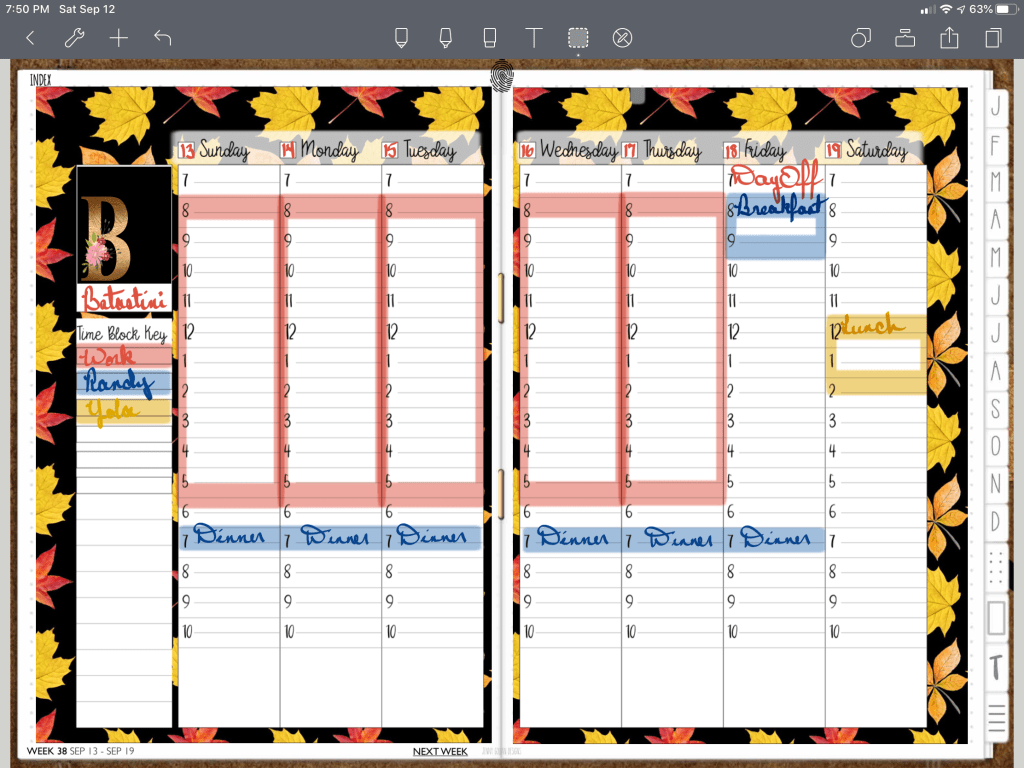
First, open your favorite planner. Add in a fall themed background sticker. The 2020 DigiBujo that I use is a blank custom planner so I can build each page as I like. Then add in the weekly color block sticker. I used the highlighter to make the days of the week pop up against the colorful background. Then I used the lasso and sent the background images to the back and locked them in place. This is a neat feature of Noteshelf. This allows me to lasso and move the weekly sticker to the front. Lock this also. Next I added in a monogram B sticker.
Then I use another app called Pixel Picker to identify existing colors on my page. Take a screen shot of your page and import that image to the Pixel Picker app. This allows you to pick out individual colors and tells you the hex code needed to add colors into other apps.
Once I have the hex code I want, I go back to Noteshelf and add the custom color into the pen tool and then into the highlighter tool.
Color blocking is an easy visual reference to identify certain topics or subjects by color. The weekly layout sticker I used has a key to fill in making this very easy to use. I selected different colors for different people and work. Use the colors and subjects that work for you. That’s it! Just fill in the rest of the week as it pertains to you.
Video Instructions:
📖Previously known as http://www.youtube.com/MariasDigitalPlanning
🛍 Products Used in this video:
See disclosure below.
- 2020 DigiBujo: https://etsy.me/2T08xny
- Time Block stickers: https://etsy.me/2WxTGlC
- Autumn Fall Papers: https://etsy.me/30g91gB
- B monogram: https://etsy.me/2PRxNJR
✂️Use code MARIACOUPON to save 20% @JennyGollanDesigns
🌺Jenny Gollan Designs Facebook group: https://www.facebook.com/groups/DigitalPlannersWorldwide/
✍🏼Sign up for the Jenny Gollan Designs Newsletter for great info and freebies! It comes to you once a month. Sign up here: http://eepurl.com/0QFc9
Disclosure:
Crafting: All products were personally purchased. My videos express my experience and my personal opinion of the products I use. I do not work for nor represent any of these companies. I do not do sponsored videos.
Digital: I am a brand ambassador for Jenny Gollan Designs. However, I only show products I like and use myself. I either buy them, or get them at a discount unless otherwise identified as freebies.

 Maria’s Craftroom