

Hi this is Maria… Welcome to Maria’s Craftroom! Today we’re making a reusable weekly layout in Procreate using Brushes, Clipping Mask and what I call Parchment Paper Overlay. This will be usable in any note taking app.
Instructions:
Lets open our favorite planner and get started. First, I like to export the planner page into Procreate. This lets me work within the specific dimensions of my planner. Once in Procreate, I flood the page in my color of the day. Today is a pretty orange. Use the arrow tool to bring that layer into the confines of my planner.
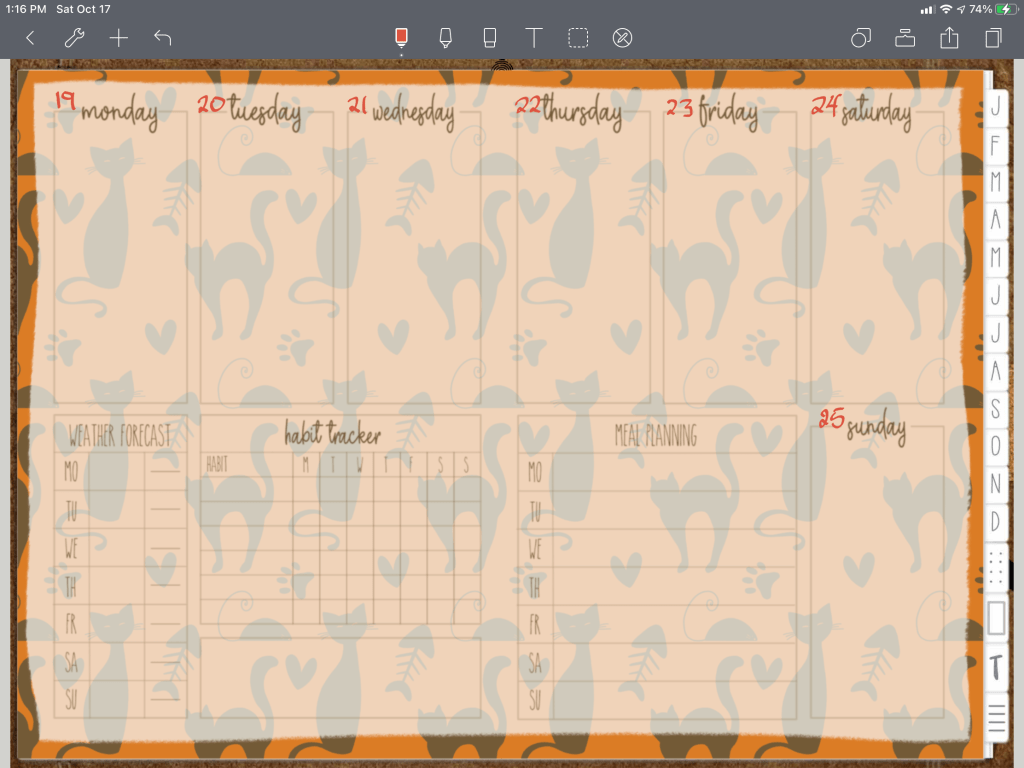
Add a new layer and add a patterned cat brush. I love this fanciful brush! Make sure the orange layer is set to reference, then set the cat layer to clipping mask. This will keep the kitties confined to the orange layer.
Add another layer to make the transparent Parchment Overlay. Again, I flooded the page with a white or off white (chose whatever color you want). Then, I used a torn eraser brush to create a fun edge to the new layer. Lower the opacity to the desired level. Make sure you stay in “normal” in that opacity view.
Add another layer to add in the weekly stamp brush. That is it. Another easy weekly spread is made. You can add the numbers in if you like. I like to make mine reusable, so I add the numbers in once I’m in my notetaking app.
Then, we make a stand alone Parchment Overlay. This way you can use it over any patterned paper at any time without having to use Procreate to lower the opacity of the original design. I really like the papers that I use, but they are hard to write over. This Parchment overlay solves that for me.
So, I guess this vido is a 2 for 1! Both were very easy to make.
Video Instructions:
📖Previously known as http://www.youtube.com/MariasDigitalPlanning
🛍 Products Used in this video:
See disclosure below.
- The 2020 DigiBujo: https://etsy.me/2T08xny
- Cat brush: https://etsy.me/2usa1MF
- Eraser brush: https://etsy.me/2THptOP
- Calendar layouts: https://etsy.me/2YYllh0
- Valentine brush: https://etsy.me/2YOMFxE
✂️Use code MARIACOUPON to save 20% @JennyGollanDesigns
🌺Jenny Gollan Designs Facebook group: https://www.facebook.com/groups/DigitalPlannersWorldwide/
✍🏼Sign up for the Jenny Gollan Designs Newsletter for great info and freebies! It comes to you once a month. Sign up here: http://eepurl.com/0QFc9
Disclosure:
Crafting: All products were personally purchased. My videos express my experience and my personal opinion of the products I use. I do not work for nor represent any of these companies. I do not do sponsored videos.
Digital: I am a brand ambassador for Jenny Gollan Designs. However, I only show products I like and use myself. I either buy them, or get them at a discount unless otherwise identified as freebies.

 Maria’s Craftroom